The Catalyst Planning App

OVERVIEW

Catalyst Planning is a mobile app designed to help STEM students manage demanding schedules through smart planning, focus tools, and streamlined collaboration. Instead of acting as a passive calendar, the app actively supports productivity and reduces overwhelm.

YEAR

2025

ROLE

UX/UI Designer

SERVICES

User Research

UX Strategy

Information Architecture

Wireframing

Prototyping

UI Design

Usability Testing

About the project

The Challenge

STEM students rely on multiple tools that are easy to ignore and difficult to maintain, leading to missed deadlines, poor time estimation, and burnout. The goal was to create a system that simplifies planning while actively supporting focus and productivity.
User Research

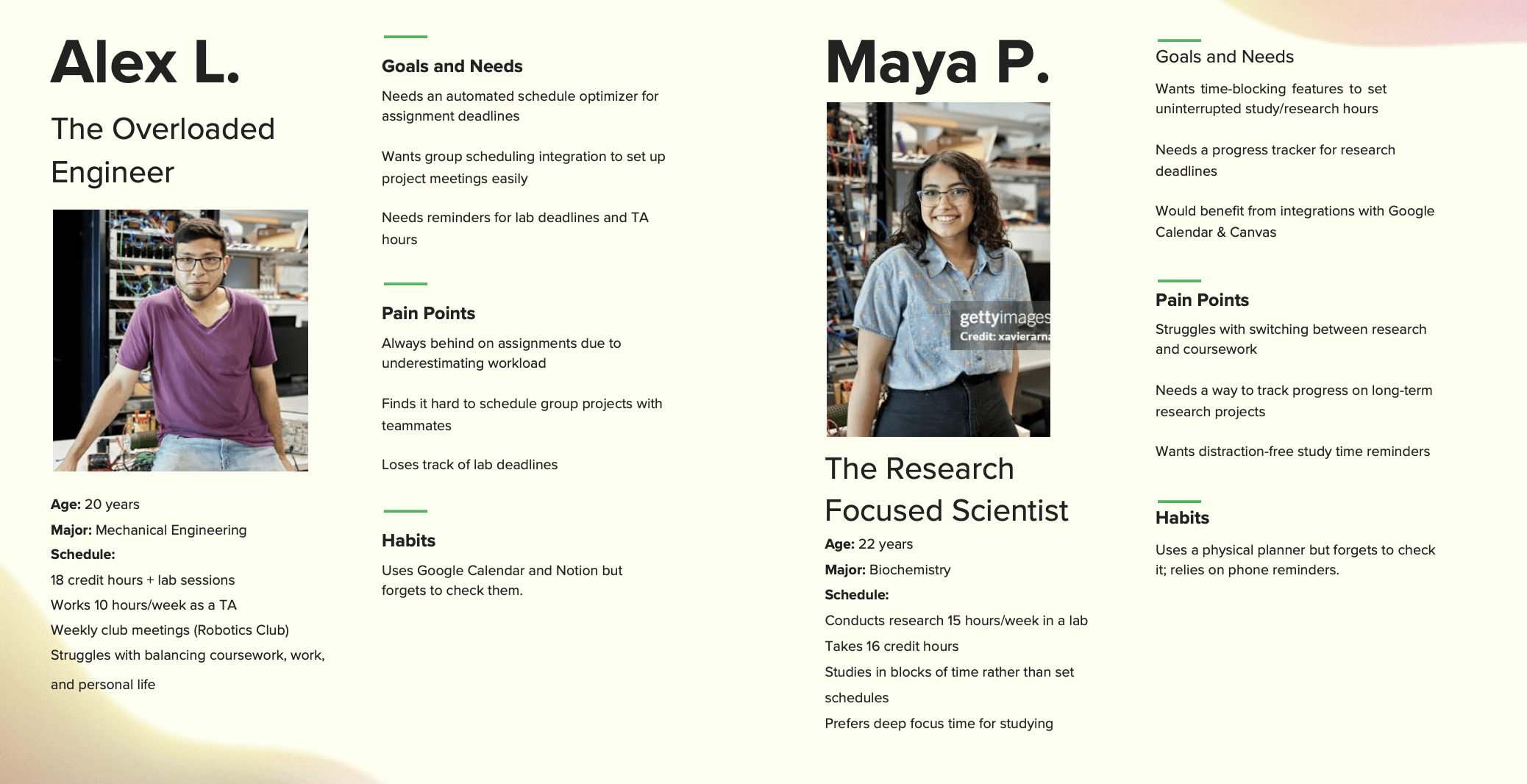
Research revealed two primary user types: students overwhelmed by packed schedules and students needing structured deep-focus time. Key pain points included forgetting deadlines, difficulty coordinating group work, and frustration with overly complex tools.

User Journey

The experience was designed across five stages: awareness, onboarding, planning, execution, and reflection. Key opportunities included simplifying setup, automating scheduling, supporting focus, and providing feedback on productivity.
Prototyping

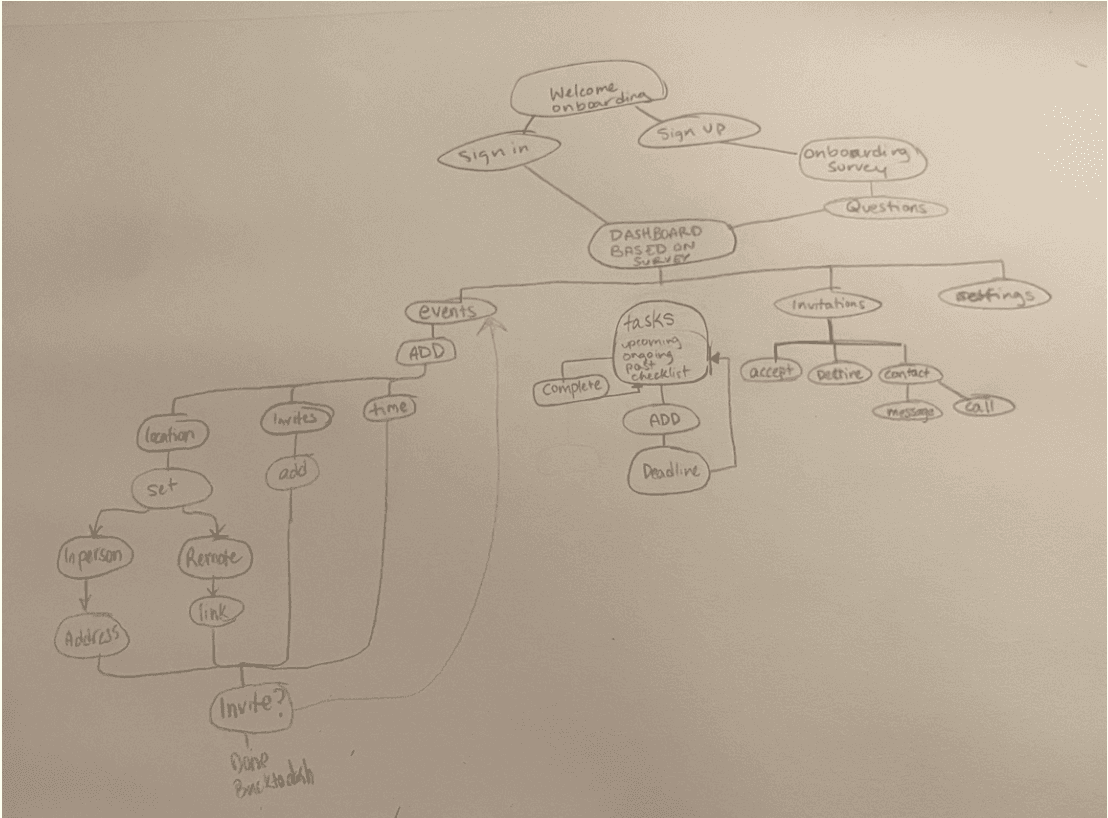
Early concepts were too complex, so the system was simplified to prioritize core actions: tasks, events, and collaboration. Iterations moved from paper sketches to high-fidelity prototypes, guided by usability testing and A/B refinement.

The final interface features smart scheduling, a focus mode with Pomodoro timing, collaboration tools, and a customizable dashboard that creates a structured yet flexible system that helps students stay organized and engaged.


Tap to See Walk Through Below!

Smooth Scroll
This will hide itself!

The Catalyst Planning App

OVERVIEW

Catalyst Planning is a mobile app designed to help STEM students manage demanding schedules through smart planning, focus tools, and streamlined collaboration. Instead of acting as a passive calendar, the app actively supports productivity and reduces overwhelm.

YEAR

2025

ROLE

UX/UI Designer

SERVICES

User Research

UX Strategy

Information Architecture

Wireframing

Prototyping

UI Design

Usability Testing

About the project

The Challenge

STEM students rely on multiple tools that are easy to ignore and difficult to maintain, leading to missed deadlines, poor time estimation, and burnout. The goal was to create a system that simplifies planning while actively supporting focus and productivity.

User Research

Research revealed two primary user types: students overwhelmed by packed schedules and students needing structured deep-focus time. Key pain points included forgetting deadlines, difficulty coordinating group work, and frustration with overly complex tools.

User Journey

The experience was designed across five stages: awareness, onboarding, planning, execution, and reflection. Key opportunities included simplifying setup, automating scheduling, supporting focus, and providing feedback on productivity.
Prototyping

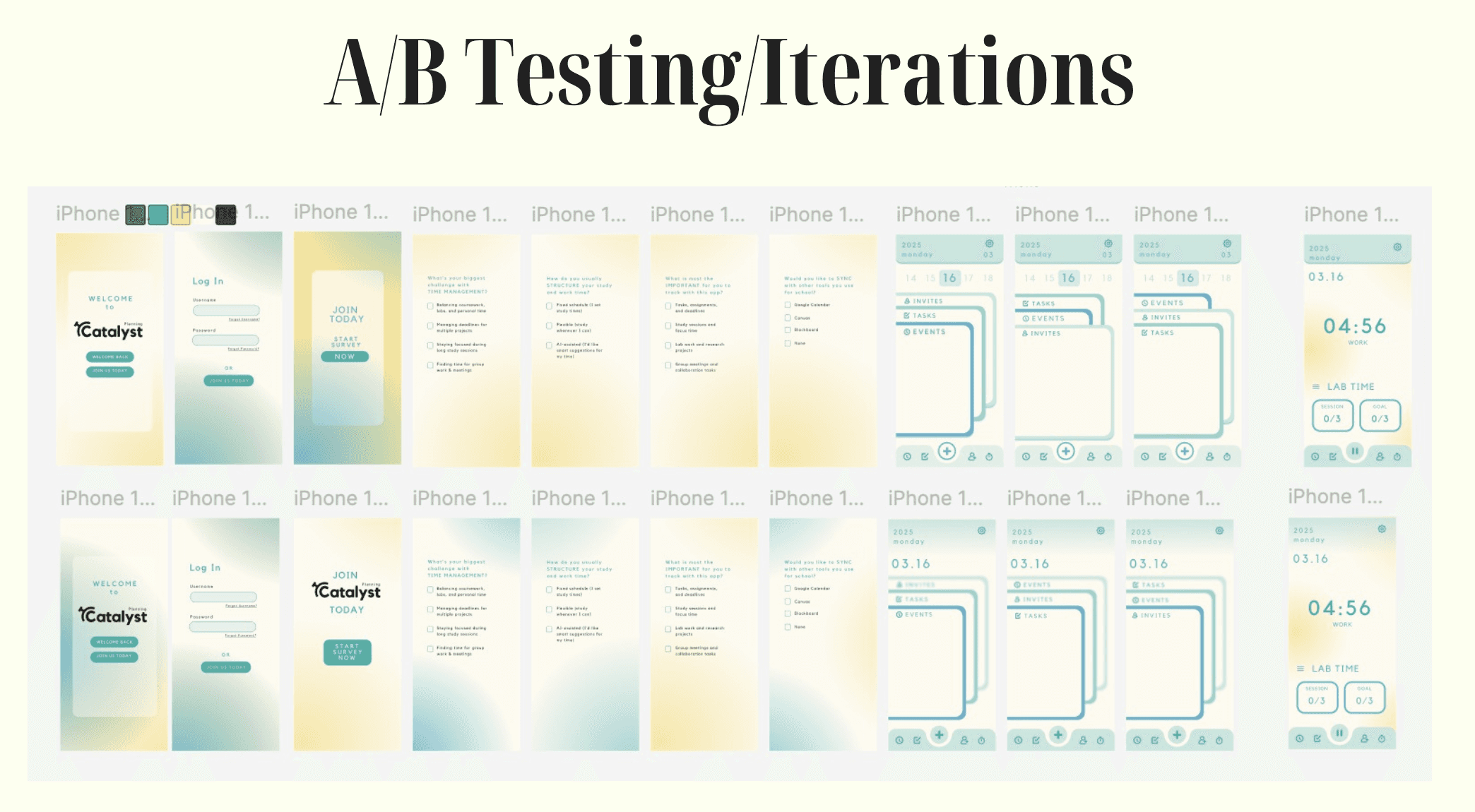
Early concepts were too complex, so the system was simplified to prioritize core actions: tasks, events, and collaboration. Iterations moved from paper sketches to high-fidelity prototypes, guided by usability testing and A/B refinement.

The final interface features smart scheduling, a focus mode with Pomodoro timing, collaboration tools, and a customizable dashboard that creates a structured yet flexible system that helps students stay organized and engaged.


Tap to See Walk Through Below!

Smooth Scroll
This will hide itself!

The Catalyst Planning App

OVERVIEW

Catalyst Planning is a mobile app designed to help STEM students manage demanding schedules through smart planning, focus tools, and streamlined collaboration. Instead of acting as a passive calendar, the app actively supports productivity and reduces overwhelm.

YEAR

2025

ROLE

UX/UI Designer

SERVICES

User Research

UX Strategy

Information Architecture

Wireframing

Prototyping

UI Design

Usability Testing

About the project

The Challenge

STEM students rely on multiple tools that are easy to ignore and difficult to maintain, leading to missed deadlines, poor time estimation, and burnout. The goal was to create a system that simplifies planning while actively supporting focus and productivity.

User Research

Research revealed two primary user types: students overwhelmed by packed schedules and students needing structured deep-focus time. Key pain points included forgetting deadlines, difficulty coordinating group work, and frustration with overly complex tools.

User Journey

The experience was designed across five stages: awareness, onboarding, planning, execution, and reflection. Key opportunities included simplifying setup, automating scheduling, supporting focus, and providing feedback on productivity.

Prototyping

Early concepts were too complex, so the system was simplified to prioritize core actions: tasks, events, and collaboration. Iterations moved from paper sketches to high-fidelity prototypes, guided by usability testing and A/B refinement.

The final interface features smart scheduling, a focus mode with Pomodoro timing, collaboration tools, and a customizable dashboard that creates a structured yet flexible system that helps students stay organized and engaged.


Tap to See Walk Through Below!

Smooth Scroll
This will hide itself!

Create a free website with Framer, the website builder loved by startups, designers and agencies.